


Skip to content
PleeroInstall

Return & refund abuse protection for Shopify

Stop paying for return and refund abuse.

Pleero scores every return request against your own store's history — before the money leaves — and tells you why, in plain English.

Keep your generous return policy. Just stop applying it to the handful of people abusing it.

Free on theShopify App Store

Free plan · Every feature on every plan · No overages · No contracts

Pleero, in 68 seconds

Order #1046, as your staff sees it

Order #1046 in Shopify admin: Paid, Fulfilled, Return requested.
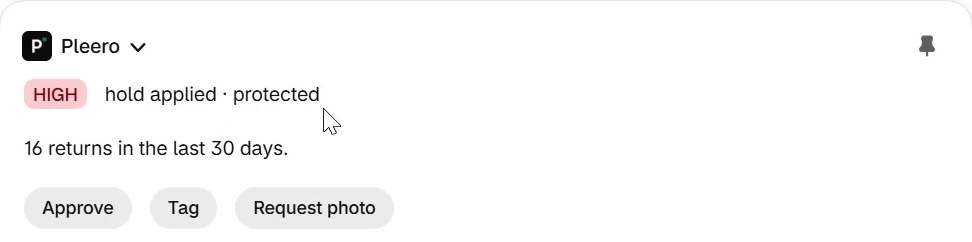
Pleero block on order #1046: HIGH, hold applied · protected. 16 returns in the last 30 days. Buttons: Approve, Tag, Request photo.
  1. From this store's own history — not a black-box score.

Where it goes today

The same customers return everything, and nobody notices until it's too late.

When you approve a return or press Refund, Shopify tells you nothing about who is asking. So most stores end up doing one of three things.

  1. 01

    Eat the loss.

    Call it the cost of doing business, and watch it grow.

  2. 02

    Triage by hand.

    Export orders to a spreadsheet, count returns per customer, build Flow tags — weeks late.

  3. 03

    Punish everyone. (the one Pleero exists to avoid)

    Restocking fees, shorter windows, no returns on sale items. The customers who were never the problem pay for the few who are.

Keep your generous return policy. Just stop applying it to the handful of people abusing it.

One return, followed

Here's what happens to a return with Pleero installed.

Order #1046, captured on our development store. Nothing here is a mockup.

  1. 01 · #1046 · return requested

    A customer asks to send back a T‑shirt.

    The reason they gave: damaged or defective. Shopify shows you the request. It doesn't show you this customer's history.

    Order #1046 in Shopify admin: Paid, Fulfilled, Return requested.
    Line item Classic Cotton T-Shirt - Green, $42.75, with Return reason: Damaged or defective.
    1. The customer's stated reason. A damaged or defective return is protected — remember this one.
  2. 02 · #1046 · scored

    Pleero scores it before anyone presses Refund.

    Every return request is scored against your store's own history and lands on the order page as a band — low, medium or high — with what Pleero did about it.

    Pleero block on order #1046: HIGH, hold applied · protected. 16 returns in the last 30 days. Buttons: Approve, Tag, Request photo.
    1. High band. Hold applied, because this return is protected.
  3. 03 · #1046 · reason

    The reason is a sentence you can check.

    Not “high return rate.” A specific statement built from your own numbers. No reason, no score — Pleero never shows one without the other.

    Pleero block on order #1046: HIGH, hold applied · protected. 16 returns in the last 30 days. Buttons: Approve, Tag, Request photo.
    1. 16 returns in the last 30 days — from this store's own records.
  4. 04 · #1046 · action

    One click, without leaving the order.

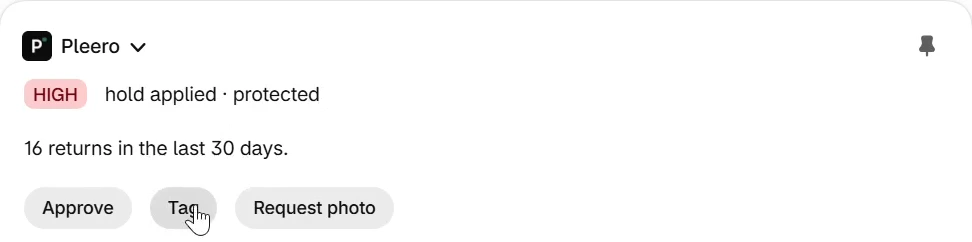
    Approve, tag, or ask for a photo — right where you already are. The block updates in place. No new tab, no separate dashboard.

    The same Pleero block with the pointer on the Tag button.
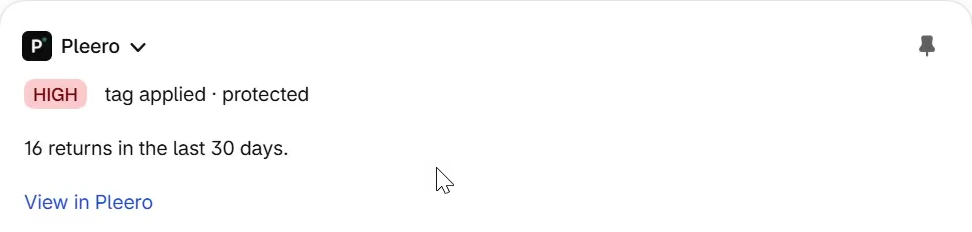
    1. Tag, clicked on the order page.
    Pleero block after the click: HIGH, tag applied · protected, with a View in Pleero link.
    1. Done. The block shows the action taken.
  5. 05 · customer page

    Their history follows them.

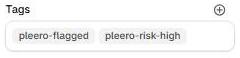
    Open the customer and Pleero's flags for them are there, along with the tags it applied — ordinary Shopify tags, so Flow and the rest of your admin can use them.

    Pleero block on a customer page listing three HIGH flags: 14, 13 and 12 returns in the last 30 days.
    1. Every flag Pleero raised for this customer.
    Shopify customer tags: pleero-flagged, pleero-risk-high.
    1. Shopify tags.
  6. 06 · set up once

    Pin it once. It's on every order.

    Add Pleero's block to an order page and pin it. Shopify shows it to all staff, on every order, from then on. That's the whole setup on the order page.

    The Pleero block on an order page, with its pin icon in the top-right corner.
    1. The pin. One click, once.
    Shopify admin toast: You pinned Pleero for all staff. Undo.

    Shopify's confirmation, after that one pin.

How it decides

A score you can argue with.

Pleero is a readable rule set, not a black box. Every signal compares a customer with your store's own normal — a return rate that's ordinary for apparel can be alarming for supplements.

Every decision is kept as a record: what it was computed from, the score, the reasons, the rule version, the action, who took it and when. An override is a new record, never an edit — so “why was this flagged?” has an answer weeks later.

What it looks at

Return rate
How often this customer returns, compared with how often your customers return.
Refunded value
How much of what they ordered came back as refunds, against your store's normal ratio.
Return velocity
Several returns inside 30 days.

What keeps it fair

  • A customer with fewer than three orders can't trip a return-rate signal. Nobody reaches high on a tiny denominator.
  • Under 30 orders of store history, Pleero won't compare anyone to an average — it says so instead of comparing against noise.
  • The customer being scored is left out of your store's average, so an outlier can't drag “normal” toward themselves.
  • No score is ever shown without the reasons behind it. If nothing stands out, the reason says that, with the numbers.
  • The only inputs are what this customer has done at your store. Nothing about who they are is scored.

Guardrails

Blocking a good customer costs more than the return. So Pleero holds back.

When the law protects the refund, Pleero holds it for you.

Defective, damaged and not-as-described returns — and, in the UK and EU, returns inside the statutory withdrawal window — are protected. Pleero won't restrict them to store credit or decline them, whatever your settings say. When it isn't sure, it treats the return as protected.

Order #1045 line item Classic Rib Tank, $30.40, with Return reason: Damaged or defective.
  1. A damaged or defective return.
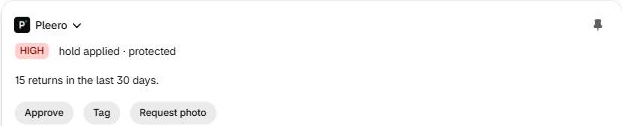
Pleero block on order #1045: HIGH, hold applied · protected. 15 returns in the last 30 days. Buttons: Approve, Tag, Request photo.
  1. High band, and the store had set high to restrict to store credit. Pleero held it instead.
  2. Restrict and decline aren't offered on this return.
Nothing acts on its own until you turn it on.

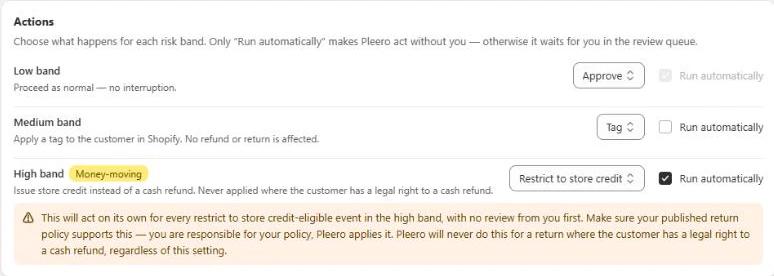
You choose an action for each risk band. Only the ones you set to run automatically act without you; the rest wait for you. Nothing declines automatically out of the box, and every money-moving setting carries this warning, word for word.

Pleero Settings, Actions: Low band Approve; Medium band Tag; High band, marked Money-moving, Restrict to store credit with Run automatically checked, and a warning: This will act on its own for every restrict to store credit-eligible event in the high band, with no review from you first. Make sure your published return policy supports this — you are responsible for your policy, Pleero applies it. Pleero will never do this for a return where the customer has a legal right to a cash refund, regardless of this setting.
  1. Opt-in, per band.
  2. The inline warning, exactly as merchants see it.

“This will act on its own for every restrict to store credit-eligible event in the high band, with no review from you first. Make sure your published return policy supports this — you are responsible for your policy, Pleero applies it. Pleero will never do this for a return where the customer has a legal right to a cash refund, regardless of this setting.”

Settings → Actions, verbatim

Your week with Pleero

About one login a week. Two minutes.

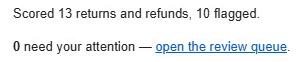
Good customers are approved and never notice Pleero exists. What needs you comes to you: on the order page while you're working, and in one plain weekly email.

There is no dashboard to check. If a number matters, it's in the email.

The weekly digest, from a real send

Weekly digest email body: Scored 13 returns and refunds, 10 flagged. 0 need your attention — open the review queue.

Shopify Flow, reacting to Pleero's “Return risk scored” trigger

Shopify Flow recent runs: Pleero - Tag customer and Pleero — Test Return Risk Trigger, each Completed.

Already run your store on Flow? Pleero plugs in as a trigger, so your own workflows can act on a scored return.

What Pleero is not.

Not a returns portal
Keep the one you have. Pleero scores the return requests that reach Shopify.
Not checkout fraud screening
Pleero looks at returns and refunds, after the sale.
Not chargeback representment
That's recovering money after it's gone. Pleero works before it goes.
Not AI or machine-learning scoring
The rules are readable, and every flag says which one fired.
Not a dashboard
The order page and one weekly email are the product.
Not a blacklist your customers see
Customers never see a score, a band, or Pleero's name.

Pricing

Priced on volume. Every feature on every plan.

Free to install. No overages, no contracts, cancel anytime.

Pleero plans by monthly price and scored return requests per month
Free$0 / moUp to 50 scored return requests / monthSmall stores, and every store's first month of proof
Growth$29 / moUp to 300 scored return requests / month$500K–$2M a year
Scale$79 / moUp to 1,500 scored return requests / month$2M–$10M a year
Pro$199 / moUnlimited scored return requests / month$10M+, or high return volume

Prices in USD, billed every 30 days through Shopify. Go over your plan's limit and nothing is billed and nothing stops — Pleero keeps scoring for the rest of the billing period and asks you to upgrade.

On the Shopify App Store

Keep your generous return policy.

Install Pleero and every return request is scored against your own store's history. Pin its block to an order page once, and the score and its plain-English reason show on every order. Nothing is declined unless you turn it on.

Free on theShopify App Store

Free plan · Every feature on every plan · No overages · No contracts